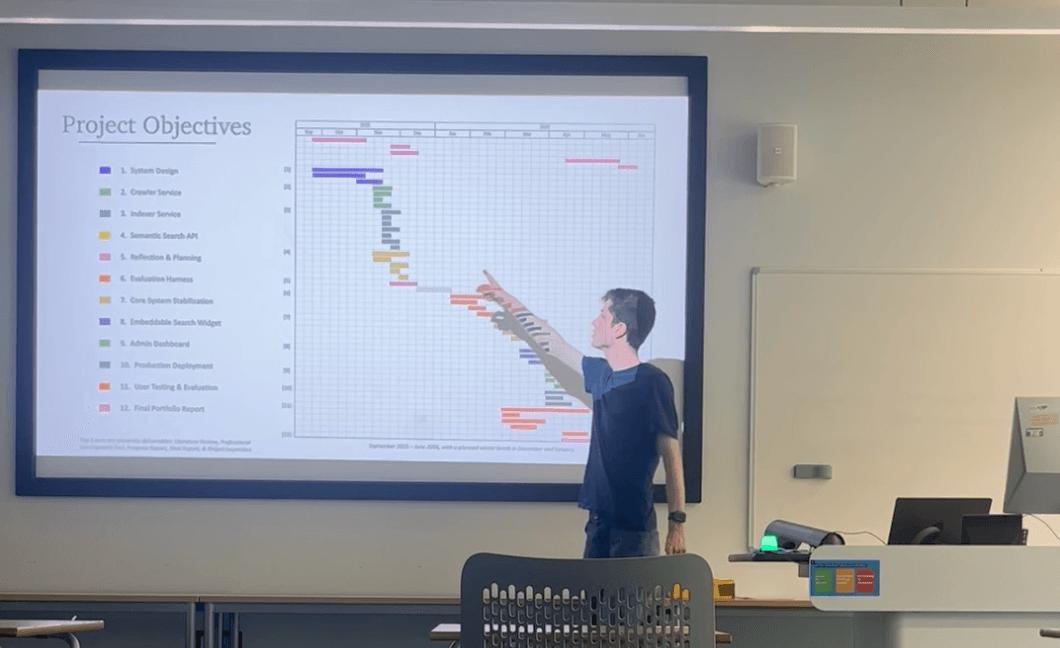
Search on many websites still runs on keyword matching, which breaks the moment a visitor and a page describe the same thing in different words. For my final-year project I built a way around that: a semantic search platform a site owner can add to their site with a single script tag, which retrieves by meaning instead of keywords. What follows is the build story behind it - the decisions, the trade-offs, and how it ended up beating Google's own Programmable Search Engine (PSE) in a blind test.
The problem worth solving
The problem it solves is old and well documented. Keyword search depends on the words in your query matching the words on the page, and people often do not pick the same words. In a classic 1987 study, Furnas and colleagues found that two people choose the same term for the same thing less than 20% of the time.1 Ask a keyword engine "how text is converted into vectors" and it will happily miss the page titled "embedding models", even though that page is exactly what you wanted. Semantic search closes this gap by comparing meaning instead of characters: content and queries are embedded as numerical vectors, and results are ranked by how close they sit in that space.
The catch is that adding semantic search to an existing website normally means building a crawler, an extraction pipeline, an embedding step, a vector database and a frontend, then keeping them all alive. My project packages that whole stack behind one embeddable widget.
The system at a glance
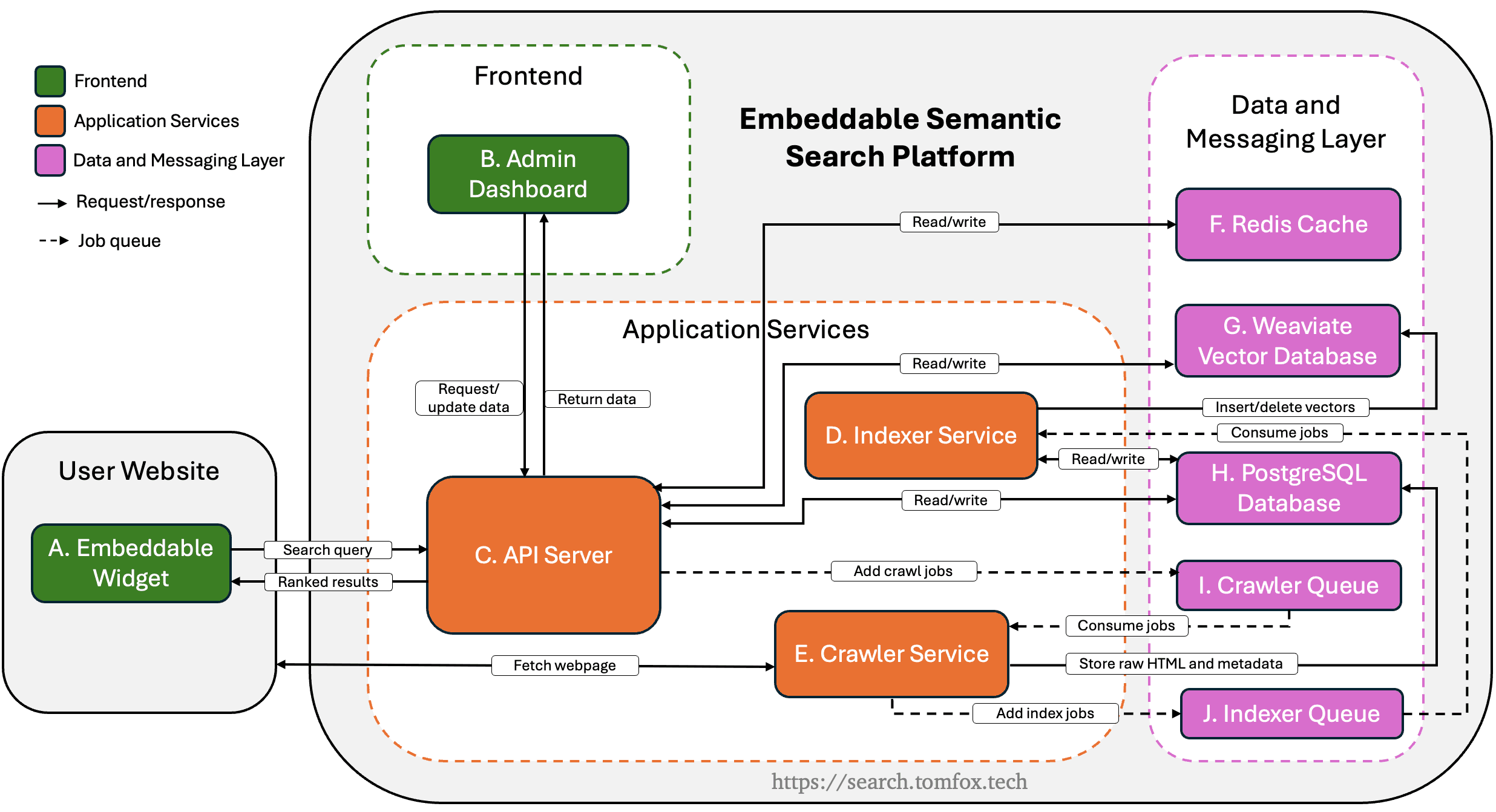
The platform is a TypeScript monorepo with five deployable applications. A crawler fetches pages and stores the raw HTML in PostgreSQL. An indexer reads that HTML, extracts and chunks the text, generates embeddings with a locally run transformer model, and writes them to Weaviate. Two BullMQ job queues link the ingestion services. A Fastify API answers queries, with Redis holding response caches and rate-limit counters, and a Next.js dashboard sits on top for administration. The fifth is the widget: a single self-contained script a site owner drops onto any page, which returns a ranked list of results and an optional AI summary.
<div class="ssw-search"></div>
<script src="https://api.search.tomfox.tech/widget/v1.js?site=public_key"></script>The whole platform runs in production on a single VPS with 3 cores and 4 GB of RAM, managed through Coolify, and currently serves search across three live websites. Keeping it deployable on modest, self-hosted hardware shaped a lot of the decisions below.
One service becomes two
The original plan had a single ingestion service: fetch a page, process it, store the vectors. In reality, as the project got under way, I realised that crawling and indexing were two very different workloads, and the split that replaced it ended up being one of the most important structural decisions in the project.
The crawler is I/O- and render-bound and exposed to the unpredictability of the open web: timeouts, redirects, half-broken markup. The indexer is CPU-bound on chunking and embedding. They fail differently, retry differently and scale differently, so I separated them into two services that never call each other directly. A crawl job writes raw HTML to PostgreSQL and enqueues an index job; the indexer picks it up from there. The queues between them act as a buffer, so a burst of crawled pages cannot overwhelm the embedding step, which keeps write pressure on the vector database steady. They also centralise retries in one place: three attempts with exponential backoff, handled by the queue rather than reimplemented in each service.
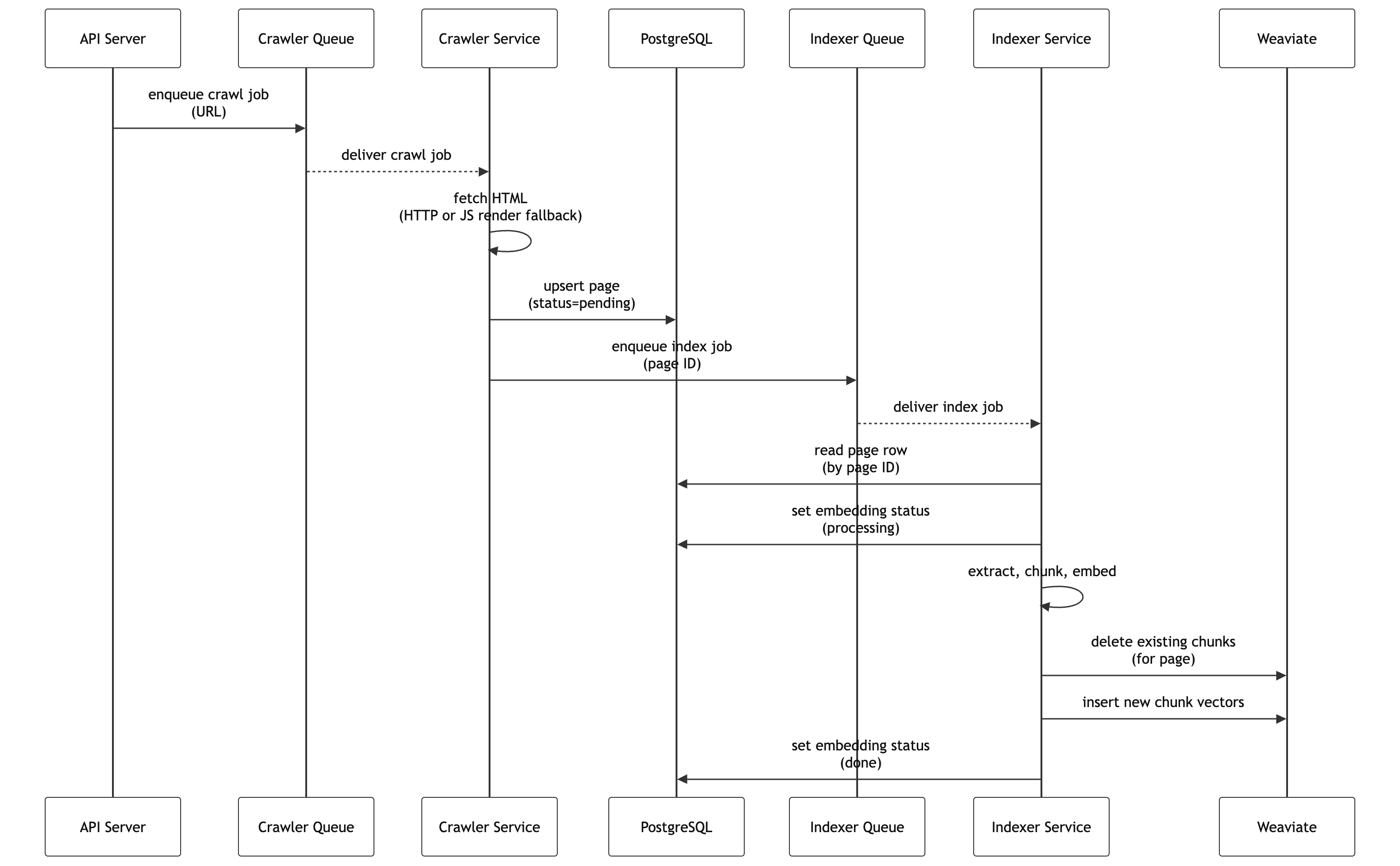
The crawler itself uses a two-tier fetch. A plain HTTP request goes first, and only if the extracted text comes back unusually short does it fall back to a full Playwright Chromium render. A headless render costs far more time and memory than an HTTP fetch, so the system only pays that price when the cheap path produces nothing usable. The browser is a long-lived singleton that shuts down after 60 seconds idle and gets recycled after 80 pages to cap the memory creep that long-running browsers accumulate, and on the render path it blocks image, media and font downloads, so the expensive render fetches only the markup the extractor actually reads.
From page to vectors
You cannot embed a whole web page as one vector. Embedding models have a maximum input length, and a long page spans multiple topics, so a single vector represents it badly. Extraction first strips the boilerplate (navigation, cookie banners, newsletter prompts) and produces typed blocks - headings, paragraphs, lists, tables - rather than one flat string of text. Chunking then packs whole blocks together up to a token budget, with a small token overlap carried between consecutive chunks so context near a boundary survives the cut. I measured chunks in tokens rather than characters, because the budget has to align with the embedding model's own tokeniser. With the page split this way, each chunk is finally embedded into its own vector.
The one encoder every site has to share
The chunk size and the encoder were both decided by an evaluation harness. It snapshots each test site once, so changes to the live version cannot contaminate results, pairs each with a fixed list of queries and their expected answer pages, and scores every configuration on mean reciprocal rank (MRR), which rewards putting the right page near the top. I tuned one parameter at a time, carrying the winner forward, and ran it against two live sites: my own portfolio and a larger legal-journal index.
For chunk size, I tested three configurations, and the smallest (256 tokens with a 32-token overlap) won on both sites over the 384 and 512-token variants. Smaller chunks seem to produce sharper embeddings: a tighter span of text covers fewer competing topics, which helps the retriever tell similar passages apart.
The embedding model was the most constrained choice in the whole system. Every site's chunks live in one shared Weaviate collection with a single vector config, which means one embedding space, which means one model for everyone. That shared collection can scale further than it looks - Weaviate's native multi-tenancy can shard each tenant into its own index - but vector config lives on the collection, not the tenant, so every site still shares one encoder. I evaluated three candidates against a MiniLM-L6 baseline, and the results were split: bge-base was the best model on the journal site but actively hurt the portfolio site and indexed far slower; MiniLM-L12 was the exact opposite, best on portfolio and worst on journal. bge-small was the best model on neither site and the only encoder that beat the baseline on both, so it is the one every site now shares.
The same change made one site better and another worse
The most interesting finding came from hybrid retrieval, which blends the semantic vector score with a classic BM25 keyword score using a weighting parameter alpha. On the journal site, a 64-page legal index, every hybrid setting I tried improved things, and alpha at 0.6 lifted MRR from 0.715 to 0.808. That one change accounts for roughly 70% of the site's total improvement.
On the portfolio site, every single hybrid setting made things worse. The best of them scored 0.722 against 0.847 for pure vector search.
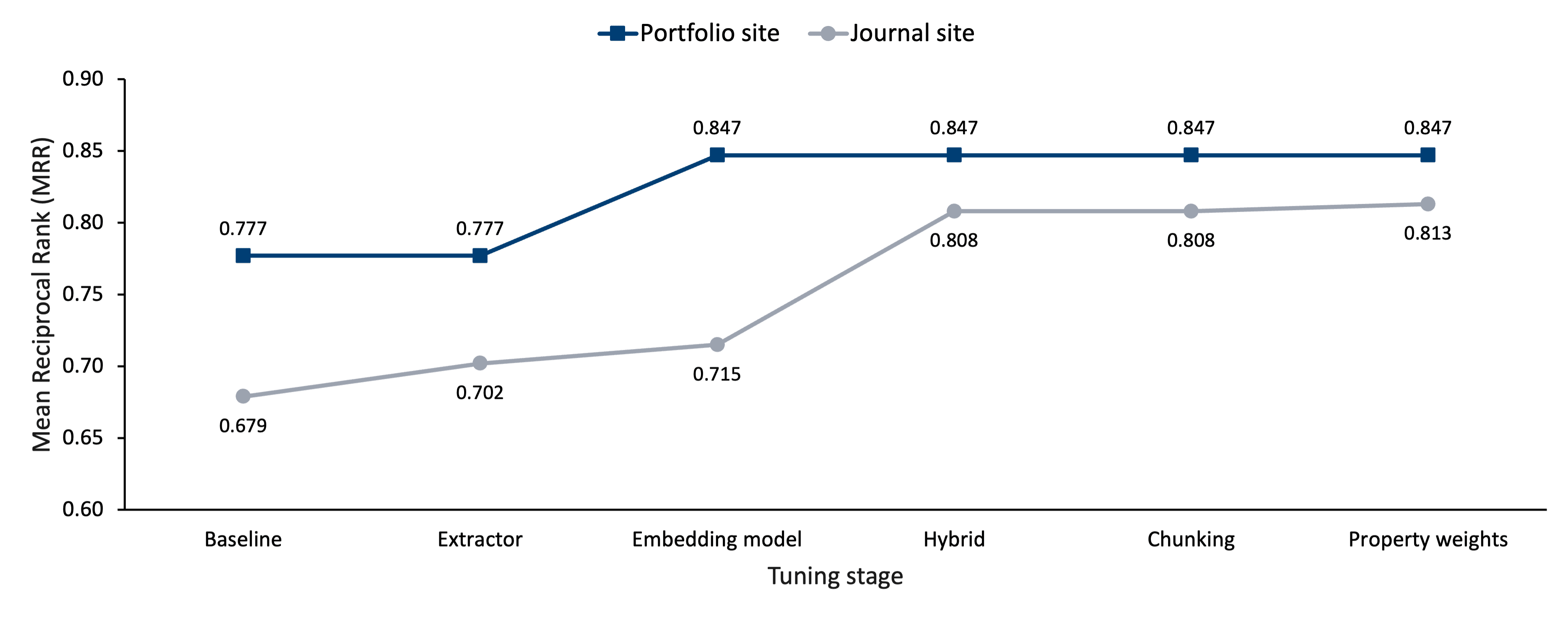
Same system, same change, opposite results. The cause is most likely the shape of each site's vocabulary. Journal pages use specialised legal terms, so when a keyword matches, it points somewhere meaningful. Portfolio pages share a small generic vocabulary (about, projects, contact) in which the same match fires on too many pages to be useful, so the lexical signal is mostly noise. This is why retrieval mode is a per-site setting rather than a global one. A single shared mode would have left one of these two sites well below its own optimum.
Property weighting turned out not to be worth tuning. Boosting title and URL matches gained 0.004 MRR on the journal site but cost 0.019 on a third site whose weights had never been tuned on - the synthetic knowledgebase built for the user study later in this post - a loss several times larger than the gain. A small gain on a site I tuned and a larger loss on one I did not is what overfitting looks like, so the user-study site kept the simpler equal-weight configuration.
By the end of the chain, journal MRR had gone from 0.68 to 0.81 and portfolio from 0.78 to 0.85.
Testing it blind against Google
Offline metrics cannot tell you how real people phrase queries or how a search feels to use, so the final evaluation was a user study against Google Programmable Search Engine (GPSE) as a commercial baseline.
A synthetic knowledgebase site was specifically built for it, ten topics of five articles each, with tasks written against that content so every one had a known correct answer. Both search systems were embedded behind neutral aliases with visually identical interfaces, so participants could not tell which was which. Six tasks were split into two sets of three, and both the set-to-system pairing and the starting system varied between participants, so no result could be explained by some tasks being harder or by which system people tried first. The study went through university ethics approval. Of twenty people invited, thirteen agreed and twelve completed it.
The headline numbers: 36/36 task attempts resolved against 22/36, a mean ease rating of 9.3 against 4.3 out of 10, and 92% of attempts on my system succeeding on the very first query against 31% for Google's. Not one attempt on my system was abandoned; 36% of Google's were.
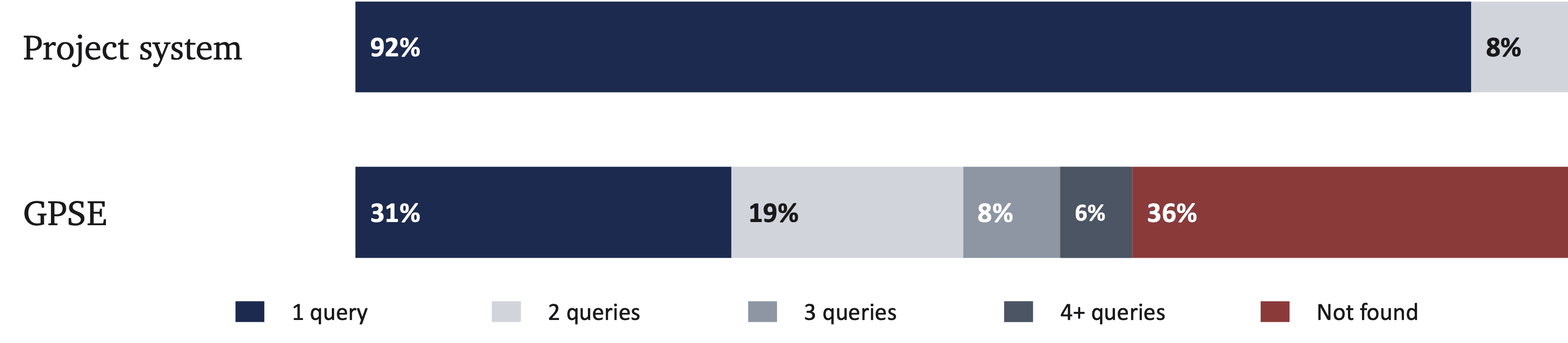
The tasks where Google collapsed are the most interesting cases. One described packet switching without ever naming it, asking about "routable message chunks", so there was little term overlap for keyword matching to use, and retrieving by meaning bridged the gap. A second, set in a fictional atlas, also described its target rather than naming it, and Google struggled there too. Success on the two fell to 43% and 29%, against 100% for my system.
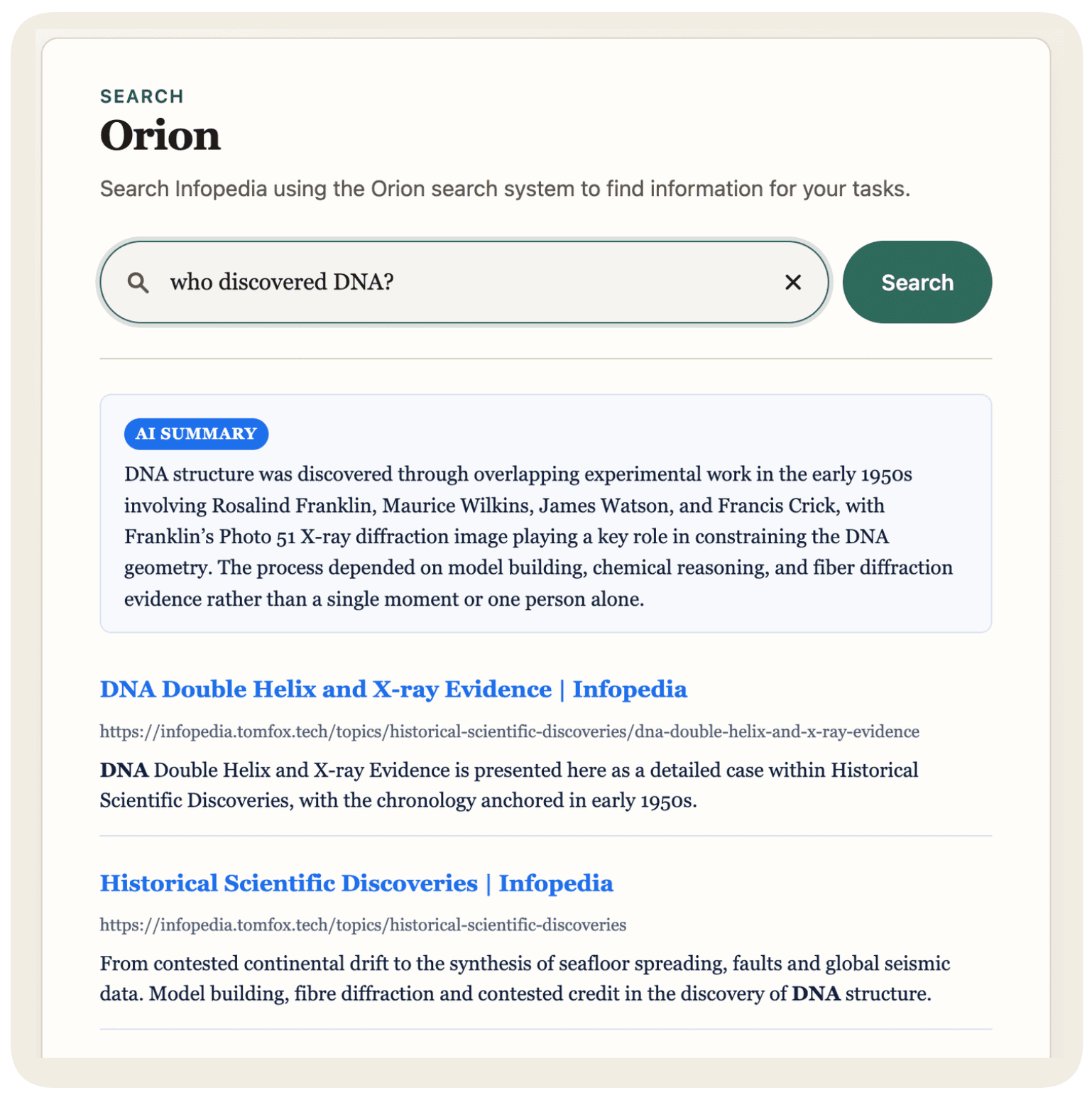
All twelve participants preferred my system overall, all twelve rated its results more relevant, and all twelve judged it closest to the quality of a major commercial search engine. Half mentioned the AI summary, an optional layer that passes the retrieved chunks to a language model, which answers strictly from that content and refuses when the content does not cover the query.
My system was tested as built, summary included, while Google shows only snippets, so the comparison is of two whole experiences rather than retrieval alone. But whether a participant found the answer at all comes down to retrieval, not the summary, since the summary is built from whatever retrieval returns and cannot supply an answer that was never found. Google's lower success rate is a retrieval gap; the summary mainly changed how easy the search felt, not whether it worked. Measured on its own, with no summary, my retrieval put the correct page at the very top for 74% of queries and in the top five for 96%.
The obvious limitation is the cohort: twelve people, recruited from friends and student peers, so this is what these participants experienced, not a proven pattern for users in general. The blind setup protects the comparison even so, since no one could tell which system was mine.
What I would do differently
The admin dashboard was the main trade-off, forced once the timeline got tight. When the evaluation harness ran weeks over its initial plan, I protected the components the project's fundamental functionality depended on: the crawler, indexer, API, widget and the study itself. The dashboard's authentication and interface shell were finished; the per-site management pages were not, so the three production sites are managed directly through backend endpoints. I still think that was the right call, since the dashboard is only a convenience layer and the system runs fully without it. The mistake was making the cut late. Deliberately reducing the dashboard to a few basic pages the week the harness started slipping would have shipped a simple interface instead of none.
The harness is the other side of the same trade-off. It is what I kept feeding time into, at the dashboard's expense, because getting the retrieval quality right mattered more. It also grew as it went: it started as a way to tune parameters automatically rather than picking values by hand, and turned into the main evaluation tool only later.
That history shows in what it does and does not do. Tuning one parameter at a time and carrying the winner forward finds a strong configuration along the path you walk, not a proven optimum. And because it was built to tune my own pipeline, which always retrieves with semantic vectors, it never had a keyword baseline. The user study covered some of that ground from the other direction, since beating Google with real users judging blind is a harder test than a baseline row in my own harness would have been. With more time I would still add that baseline, run a joint search over the parameter space, and test against an independent benchmark like BEIR. In the end, I just had to stop and move on to finish the project.
Where it is now
The platform is deployed and serving search in production across three live websites, on that same 4 GB VPS. One of them is the site you are reading right now: this site's pages are crawled, chunked, embedded and ranked by the exact pipeline this post describes.
The full report
The full report
The complete write-up behind this post: the system architecture, the design decisions and methodology, the implementation, and the full evaluation with results and analysis.
The code is public on GitHub: the crawler, the indexer, the API, the evaluation harness, the dashboard and the widget, all in one monorepo.
View the source code on GitHubCoookei/Semantic-Search-PlatformThe project started because I wanted a search bar that understood what people meant rather than what they typed. If you want to test whether it does, you know where the search bar is.
- Furnas, G.W., Landauer, T.K., Gomez, L.M. & Dumais, S.T. (1987). The vocabulary problem in human-system communication. Communications of the ACM, 30(11), 964–971. ↩